Follow these step-by-step instructions to apply for membership to the Unity Developers Student Club through the Online Request System (ORS):
-
Access ORS: Go to ors.ajman.ac.ae in your web browser and log in using your student credentials.
-
Navigate to eRequests: Once logged in, locate the “eRequests” tab in the top navigation bar and click on it.

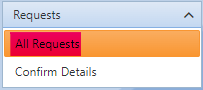
- Select All Requests: In the sidebar menu, click on “All requests” to access the list of available request types.
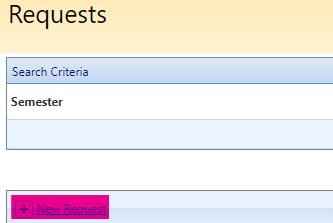
- Initiate New Request: Click on “New Request” to start a new request process.
-
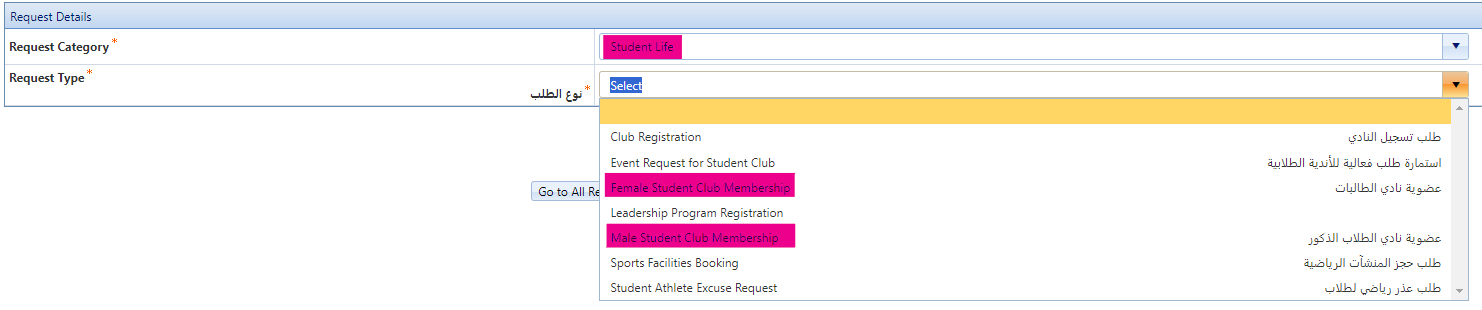
Choose Request Category: In the “Request Details” section, select the request category as “Student Life”.
-
Select Request Type: Choose the appropriate request type based on your gender:
- For male students, select “Male Student Club Membership”.
- For female students, select “Female Student Club Membership”.
-
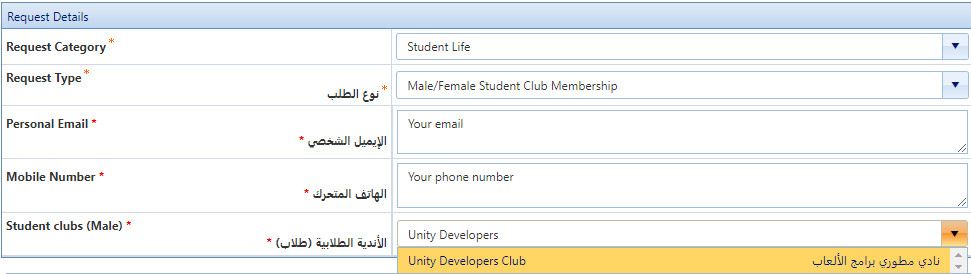
Provide Contact Information: Enter your personal email address and mobile number in the respective fields. This information will be used for communication regarding your membership application.
-
Select Student Club: From the dropdown menu labeled “Student Club”, choose “Unity Developers Club”.
- Submit Request: After filling in all the necessary details, scroll down to locate the “Submit Request” button. Click on it to finalize your membership application.

Congratulations! You’ve successfully submitted your application for membership to the Unity Developers Student Club. Keep an eye on your email for updates regarding the status of your application. If you have any questions or need further assistance, don’t hesitate to reach out to us.